Start with Your Screening Goals
When narrowing down multiple Crocs candidates to one that's worth further verification, the key is not to compare prices first. Instead, confirm that the page information is complete, that the evidence can be traced back, and identify any red flags that should make you pause.
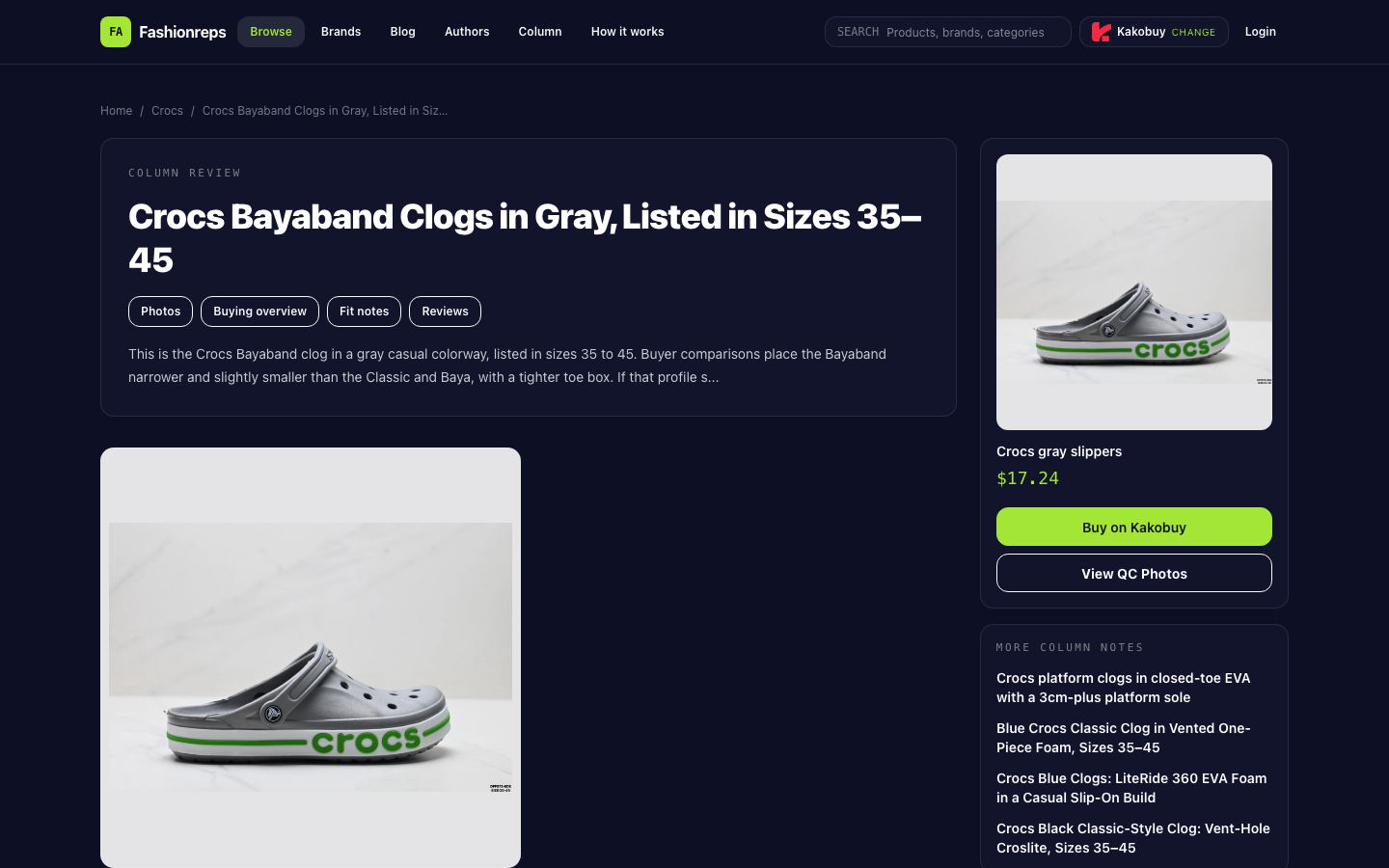
The candidate we can verify here is the Crocs Bayaband Gray Clogs on fashionreps. The page lists sizes 35–45 and shows a reference price of $17.24. It also states that the final product price, service fee, and international shipping need to be confirmed on the Kakobuy website. So the reference price isn't the final cost, and stock and shipping can't be determined from the catalog page alone.

What to Check on the fashionreps Product Page
The catalog page is good for a first round of fact-checking. I recommend checking in this order:
- Confirm the style name: make sure the page is about Bayaband, not Classic or Baya.
- Confirm the color: this page records a gray colorway.
- Confirm the size range: this page lists sizes 35–45.
- Note the reference price of $17.24 shown, while also noting that the final product price, service fee, and international shipping are not confirmed on this page.
- Save the product page URL so you can return to the same page later from your spreadsheet.
- Look at the images, QC photo entry, and text description on the page, but don't treat catalog images or the QC entry as a completed physical inspection.
The page's fit description says: Bayaband is narrower and slightly smaller overall than Classic and Baya, with a tighter forefoot. The page advises buyers not to size down just because Crocs often run loose; for this model, you should normally choose between your regular size and one size up based on your foot shape. If you need a roomy forefoot, the page's information does not support making this model a top priority.
Categorize Candidates with Evidence, Not Impressions
Put each candidate into one of three categories: Keep, Needs Verification, or Exclude. Base the categorization on traceable page facts, not on "looks good" or "cheap price".
| Status | Applicable Condition | Judgment for Current Candidate |
|---|---|---|
| Keep | Style, color, size, and product page link can all be verified, and the main fit risk meets your needs | Only temporarily keep if you can accept a narrower last and are willing to continue checking product and QC info |
| Needs Verification | Still missing stock, final fees, size details, or verifiable QC info | Reference price, service fee, international shipping, and actual availability still need to be confirmed on the shopping agent website |
| Exclude | Fit clearly conflicts with your needs, or link, product identity, and key evidence cannot be confirmed | Exclude if you need a roomy forefoot, cannot accept trying on, or are unwilling to check authenticity clues |
The page also notes that replica Bayaband may exist, and when receiving the item you can look at weight, bending performance, color saturation, and upper surface treatment as clues. These are the verification directions listed on the page; they don't mean any single clue can confirm authenticity, nor do they replace actual inspection after receiving the product.
Catalog Page vs. Google Sheets: Different Roles
The fashionreps product catalog is good for reading the context of a single candidate: you can enter from the brand or product page, view style descriptions, fit advice, image links, and agent redirects. Its value is preserving the original page context so you can go back to the source for verification.
Google Sheets is better for managing the screening results of multiple candidates. It lets you put verified fields in the same row, use filters to show "Keep", "Needs Verification", or "Exclude" records, and share the same judgment basis with others when collaborating. But the spreadsheet itself doesn't automatically prove that stock, price, or QC info is true and valid; you still need to go back to the corresponding product page or agent page to verify.
Recommended fields:
- Product name
- Style
- Color
- Page size range
- Reference price
- Final price status
- Service fee status
- International shipping status
- Image or QC evidence status
- Product page URL
- Last verification time
- Screening status
- Reason for exclude or needs verification
Don't just write "in stock", "authentic", or "worth buying" in the spreadsheet. If the page doesn't clearly support it, write "unconfirmed" and add the next page or field to check. For example, the current candidate's final cost should be recorded as "unconfirmed", not writing $17.24 as the total price.
When to Stop Screening
Stop writing a candidate as a buyable recommendation if any of the following occurs:
- The product page cannot be opened, or after clicking the link you cannot confirm it's still the same product.
- Style, color, or size information conflicts between pages, and there is no higher-credibility evidence to resolve the conflict.
- The page only has a reference price, and you cannot confirm the final product price, service fee, or international shipping, but you need to compare total cost.
- There are no corresponding images or QC evidence for the product, so you cannot support the appearance or workmanship judgment you want to make.
- Your foot shape requires a roomy forefoot, but the page clearly states that Bayaband is narrower and tighter in the forefoot than Classic and Baya.
- You cannot accept checking weight, bending, color, and upper treatment clues after receiving the product, but you need to reduce the risk of replicas.
Final Screening Conclusion
This gray Crocs Bayaband can currently be considered a candidate whose information is mostly traceable but still needs verification, not an unconditional buy recommendation. The fashionreps page provides the style, color, size range, reference price, and fit risk; Google Sheets is suitable for listing these fields alongside other candidates and recording which information is confirmed and which still needs to be supplemented from the agent page.
If your priority is the look of the gray Bayaband and you can accept a narrower last, you can continue to verify actual availability and QC info. If you care more about a roomy forefoot, or want to lock in final cost and stock before paying, you should first put it in Needs Verification or Exclude, rather than deciding based solely on the reference price in the catalog.